How to Make a Cookbook from the Recipes You Already Have
Making a cookbook can sound like a project that needs months of work and a talent for design. In practice, most of the work has already been done.
The recipes exist. They may be scattered across your phone, tucked into a drawer or buried in an old conversation, but they are there. Your job is not to invent a cookbook from scratch. It is to gather what you already have.
Start with two questions:
- Where are my recipes?
- What form are they in?
Where are your recipes now?
Take a minute and make a list. Most people are surprised by how many places their recipes have ended up.
They might be:
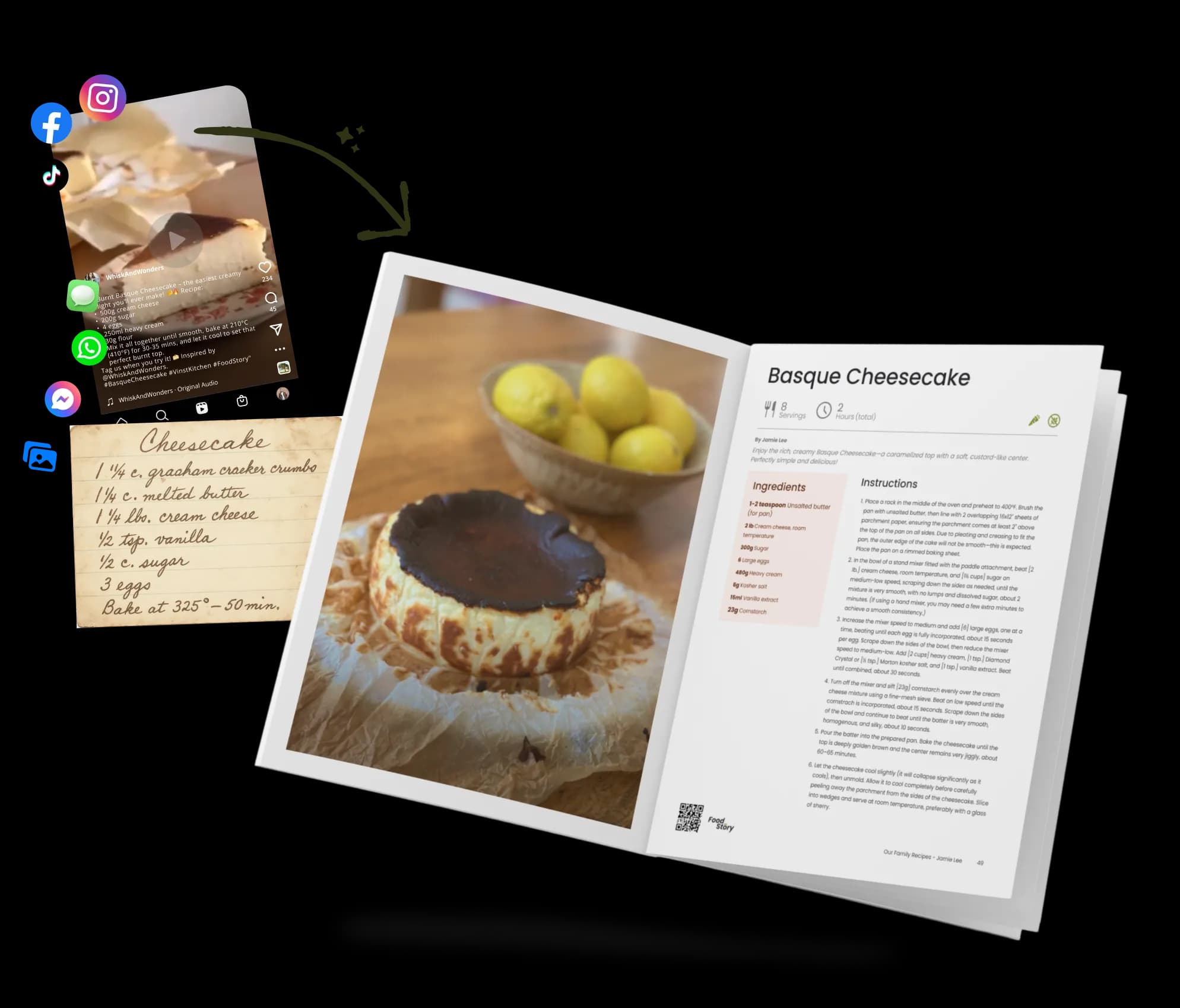
- On your phone, as screenshots, photographs or saved posts
- In a family chat or a message from a friend
- Online, in bookmarks, blogs or social posts
- On paper, from a recipe card to the back of an envelope
- In your head, because you make the dish so often that you have never written it down
You probably have more of a cookbook than you think.
Do not worry about putting everything in order yet. First, gather the recipes you would be sorry to lose.
Four ways to add a recipe
Every recipe you have will usually be one of four things:
- A picture
- Some text
- A link
- A recipe that has never been written down
Vinst’s Recipe Box has a way to add each one. Select Add a recipe, then choose Image, Text, URL or Blank.
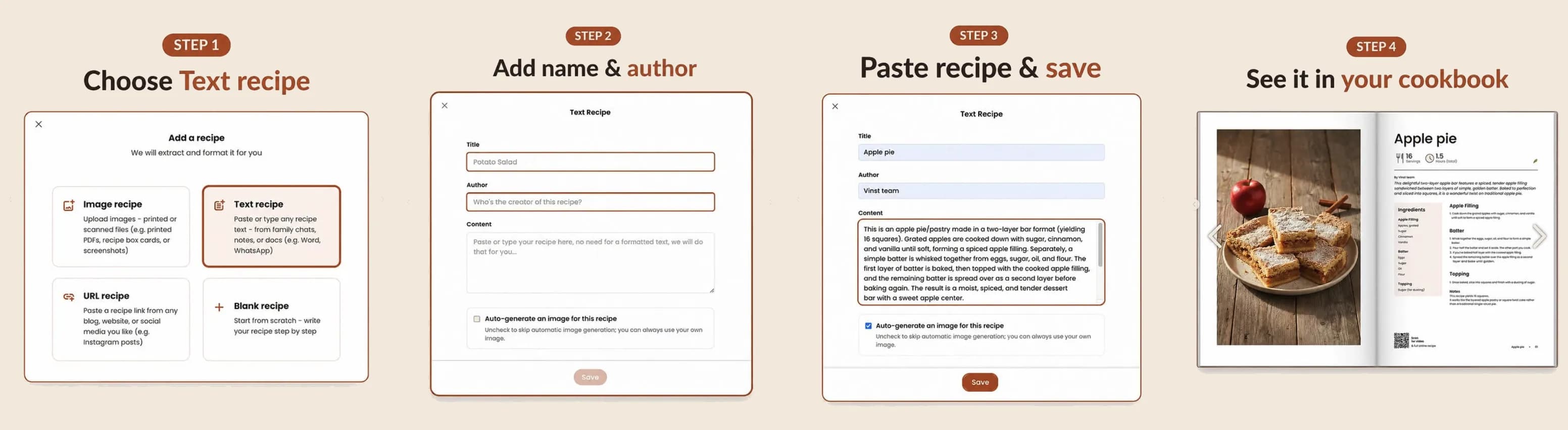
Image recipe
Use this for anything you can photograph or capture as a screenshot.
It might be your grandmother’s handwritten card, a printed page or a recipe someone sent as an image. Upload the picture and Vinst reads it, separating the ingredients and instructions into a recipe you can edit.
It is always worth checking the finished recipe against the original, especially when the handwriting is old or difficult to read.
Text recipe
Use this for anything you can copy and paste.
The text might come from a message, email, note or document. There is no need to clean it up or format it first. Paste what you have and Vinst will organize it into ingredients and instructions.
URL recipe
Use this when the recipe has a link.
Paste the address of a recipe from a blog, website or social post. Vinst pulls the recipe into a cleaner format and saves it to your Recipe Box.
Blank recipe
Use this for the recipe that only exists in your head.
Add the name, ingredients and instructions yourself. Write it as if you were explaining the dish to someone standing beside you in the kitchen.
Whichever route you take, the result is a recipe you can edit, cook from, organize and eventually print.
Add recipes as they come to mind. There is no need to collect everything at once. A book of twenty recipes your family actually cooks is more useful than a book of one hundred recipes included out of obligation.
Turning your recipes into a cookbook
Once your recipes are in the Recipe Box, making the cookbook is mostly a matter of choosing and arranging.
Start by giving the book a title and adding the author’s name. Together, the title and author must stay within 60 characters, so shorter usually works better. You can change both later.
Next, choose a cover from Vinst’s designs or upload a photograph of your own. There is no blank page to design and nothing you need to position by hand. Vinst creates the cover, spine and interior layout for you.
If you want help choosing the right photograph or title, read our guide to real cookbook cover ideas.
Inside the cookbook editor, you can add recipes in five ways: Image, Text, URL, Blank or From Recipe Box. The last option lets you choose recipes you have already saved without entering them again.
Give the book some shape
Sections are optional, but they can make a collection easier to browse.
Traditional headings such as Appetizers, Main Dishes and Desserts work well. Personal sections can make the book feel more like your own:
- Grandma’s Desserts
- The Ones We Make on Sundays
- Food for the Holidays
- Things the Children Will Eat
- Recipes Everyone Asks For
Move the recipes around until the order feels right. This is often the moment when a folder of recipes begins to feel like a real book.
You can also add a dedication at the beginning if the cookbook is being made for someone. Keep in mind that a dedication page adds $1 to the price of each printed copy.
Making a cookbook with your family
If the recipes belong to several people, begin with a shared collection.
Family members can add their own saved recipes to the collection. When everything is gathered, the collection owner can turn it into a cookbook and finish arranging it in the cookbook editor.
The web cookbook editor currently has one owner, so that person handles the final cover, sections and layout. Anyone who does not use Vinst can simply send their recipes to the owner by text, email or WhatsApp.
For a personal cookbook, you can skip the shared collection and add recipes directly from your own Recipe Box.
The process is the same either way. Gather the recipes, choose what belongs in the book, arrange them and add the personal details that make the collection yours.
Check the preview before printing
The preview shows the cookbook as it will appear in print. Take your time going through it.
Check that:
- The recipes are in the right order
- Section headings appear where you expect them
- Photographs are framed properly
- Recipe titles are correct
- Ingredients and instructions are complete
- The cover title and author name are spelled correctly
This is also where you will notice the recipe you meant to move or the photograph you wanted to replace.
Creating, editing and viewing your cookbook online is free. You pay only if you decide to order a printed copy. A hardcover copy currently starts at $40 and includes up to 20 recipes, before shipping and any optional additions.
Start with three recipes
You do not need to set aside a weekend or find every recipe your family has ever made.
Name the book, choose a cover and add the first three recipes you know belong in it. That is enough to begin.
The rest can be added whenever you remember them.
For more information visit our Knowledge Base
Frequently asked questions
Do I need to know anything about design?
No. The cover and pages are laid out for you. You choose the recipes, their order, the cover image and the words that appear in the book.
Can Vinst read a handwritten recipe?
Yes. Photograph or scan the card and add it as an Image recipe. Vinst will turn the image into structured ingredients and instructions.
Check the result against the original before printing, particularly if the handwriting is faded or difficult to read.
Can I import a PDF?
PDF files cannot currently be uploaded directly. Copy the recipe into a Text recipe, or take a screenshot of the relevant page and add it as an Image recipe.
How many recipes do I need?
There is no required minimum. If you try to print a book with fewer than six recipes, Vinst will ask you to confirm before continuing, but you can still proceed.
A printed copy starts at $40 and includes up to 20 recipes. Additional recipes increase the price.
Can my family contribute recipes?
Yes. Create a shared collection so family members can add their own recipes. The collection owner can then turn it into a cookbook and complete the final arrangement.
Is it free?
Saving recipes, building a cookbook and viewing it online are free. You pay only when you order a printed copy.
Make a cookbook of your own
You cook. We create your book.
Vinst helps you gather the recipes you love, keep them online and turn them into a printed cookbook when you are ready.